
Introduction
Cloud computing has become a vital component of our everyday lives in the current digital era, supporting anything from large-scale business systems to personal email services. Recent research indicates that the worldwide cloud computing market is anticipated to develop rapidly and reach $832.1 billion by 2025. However, what is cloud computing really, and why is it so important?
Cloud computing can appear to be a complicated and intimidating subject to people who are unfamiliar with it. By simplifying the basic concepts and elements of cloud computing, this beginner’s tutorial seeks to demystify the technology. This article can assist you whether you’re a business professional trying to learn how cloud services can aid your company or an individual wishing to improve your own IT skills.
You will have a firm understanding of cloud computing, its many advantages, and the several kinds of cloud services that are accessible by the end of this post. So let’s get started and begin learning more about cloud computing.
What is Cloud Computing?
The supply of computer services, including storage, processing power, and applications, via the internet is the fundamental definition of cloud computing (“the cloud”). More flexibility, scalability, and cost effectiveness are made possible by users accessing these resources online rather than using local servers or personal devices to manage tasks and store data.
In the 1960s, computer scientist John McCarthy proposed that computing might eventually be arranged as a public utility, which is when the idea of cloud computing first emerged. However, cloud computing didn’t become widely accepted until the early 2000s, when businesses like Amazon Web Services (AWS) led the way by providing cloud-based infrastructure services.
Key Concepts
- Virtualization: This technology allows multiple virtual machines to run on a single physical machine, optimizing resource use and providing the foundation for cloud services.
- Cloud Infrastructure: The physical and virtual resources (servers, storage, and networking) that support cloud services. This infrastructure is typically housed in data centers around the world.
- Internet-Based Computing: Cloud services are accessed via the internet, providing users with remote access to applications and data from anywhere, at any time.
Like water or electricity, cloud computing can be viewed as a utility where customers only pay for the services they consume. Compared to traditional computing, this architecture has a number of benefits, such as lower costs, increased efficiency, and the flexibility to scale resources up or down in response to demand.
Components of Cloud Computing
The foundation of cloud computing is made up of many parts that cooperate to provide streamlined and effective services. It is essential to comprehend these elements in order to understand how cloud computing functions. Below is a summary of the key elements:
Hardware and Software
Hardware
- Servers: Powerful machines that provide processing power and storage. These are the backbone of any cloud infrastructure.
- Storage Devices: High-capacity storage units that hold vast amounts of data, accessible via the cloud.
- Networking Equipment: Routers, switches, and other networking hardware that ensure data can travel quickly and securely between servers and users.
Software
- Hypervisors: Virtualization software that allows multiple virtual machines to run on a single physical machine. Examples include VMware, Hyper-V, and KVM.
- Management Software: Tools that help in managing and orchestrating cloud resources, such as OpenStack or VMware vCloud Director.
Data Centers
Data centers are specialized facilities that house the hardware required for cloud computing. They are designed to provide optimal conditions for servers and storage devices, including:
- Cooling Systems : To maintain an ideal temperature for the equipment.
- Power Supply : Reliable and redundant power sources to ensure uninterrupted service.
- Physical Security : Measures like surveillance, biometric access controls, and security personnel to protect the infrastructure.
Data centers are strategically located around the world to provide redundancy and minimize latency, ensuring users can access their data quickly and reliably.
Network Infrastructure
The network infrastructure is vital for connecting users to cloud services. It includes:
- Internet Connectivity: Users can access cloud services from any location thanks to fast internet connections.
- Content Delivery Networks (CDNs): Distributed networks of servers that deliver content based on the user’s geographic location, improving speed and reliability.
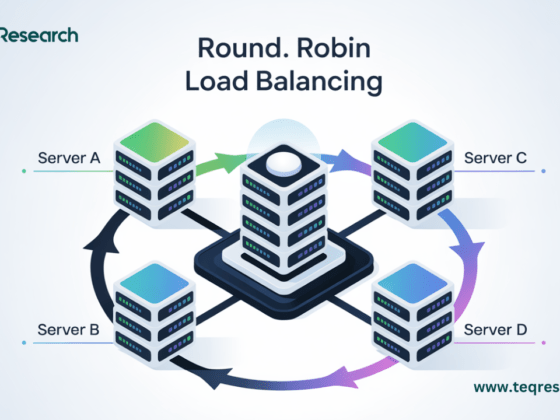
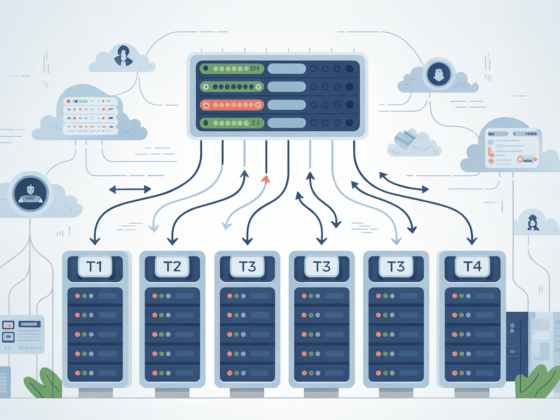
- Load Balancers: Devices or software that distribute incoming network traffic across multiple servers to ensure no single server becomes overwhelmed.
Together, these elements support the ecosystem of cloud computing, offering the cost-effectiveness, scalability, and flexibility that have made cloud computing a crucial component of contemporary technological infrastructure. We may investigate the many kinds of cloud services and how they can be implemented to satisfy different demands after we have a firm grasp of these elements.
Types of Cloud Services
The degree of control and accountability shared between the user and the cloud provider determines the classification of cloud services. Knowing these kinds makes it easier to select the best service for a given demand. The three main categories of cloud services are as follows:
Infrastructure as a Service (IaaS)
Definition: IaaS provides virtualized computing resources over the internet. It offers the most control over the cloud infrastructure.
Benefits :
- Scalability: Easily adjust resources to meet demand.
- Cost-effectiveness: Avoid the expenses of buying and maintaining hardware by only paying for the resources that are really used.
- Flexibility: Tailor the computer environment to suit certain requirements.
Examples :
- Amazon Web Services (AWS) EC2: Offers cloud computing capability that can be expanded.
- Google Compute Engine: Provides virtual machines that are housed in Google’s servers.
- Microsoft Azure Virtual Machines: Provides on-demand, scalable computer power.
Platform as a Service (PaaS)
PaaS provides a platform allowing customers to develop, run, and manage applications without dealing with the infrastructure.
Benefits :
- Development Speed: By offering pre-configured settings, it streamlines the development process.
- Less Management: This removes the need to oversee the underlying software and hardware.
- Collaboration: Using integrated tools and services, it makes it easier for development teams to work together.
Examples :
- Google App Engine: This tool lets programmers create and launch apps on Google’s servers.
- Microsoft Azure App Service: Facilitates the rapid development, deployment, and scalability of web applications and APIs.
- Heroku: A cloud platform that makes app deployment easier and supports multiple programming languages.
Software as a Service (SaaS)
Definition : SaaS delivers software applications over the internet, on a subscription basis. Users can access these applications via a web browser.
Benefits :
- Accessibility: You can use apps on any internet-connected device.
- Automatic Updates: Get the newest security patches and features automatically.
- Cost savings: Steer clear of the up-front expenses associated with buying hardware and software licenses.
Examples :
- Google Workspace: A collection of tools for productivity that includes Drive, Docs, and Gmail.
- Salesforce: A platform for customer relationship management (CRM) that aids companies in handling customer contacts and sales.
- Microsoft Office 365: Provides cloud-based versions of the company’s well-known office programs.
To choose the best cloud service for your purposes, it is essential to comprehend the differences between Infrastructure as a Service (IaaS), Platform as a Service (PaaS), and Software as a Service (SaaS). From complete infrastructure administration to merely employing programs via the internet, each option offers distinct advantages and accommodates varying degrees of control and accountability. Equipped with this understanding, you may choose the cloud services that best suit your needs. The different cloud computing deployment models will then be examined.
Deployment Models
To accommodate diverse demands and specifications, cloud computing provides a range of deployment models. These models establish who controls the infrastructure and where it is located. Public, private, and hybrid clouds are the three main deployment models.
Public Cloud
The public cloud is a deployment paradigm in which cloud services are shared across several businesses and made available via the open internet. A third-party cloud service provider owns and runs the infrastructure.
Advantages:
- Cost-effectiveness: Pay-as-you-go pricing schemes save money on software and hardware purchases.
- Scalability: Without having to make investments in physical infrastructure, resources can be readily scaled up or down to match demand.
- Reliability: Make use of the infrastructure of the provider, which frequently consists of several redundant data centers for disaster recovery and high availability.
Examples :
- Amazon Web Services (AWS): Provides databases, storage, and computation, among other cloud services.
- Microsoft Azure: Offers a wide range of cloud services, such as networking, virtual computing, and analytics.
- Google Cloud Platform (GCP): Provides services like data analytics, machine learning, storage, and computation.
Private Cloud
A single organization is the only user of cloud services in the private cloud deployment paradigm. Although the infrastructure is not shared with other companies, it may be hosted on-site or by a third-party source.
Advantages:
- Enhanced Security: Provides more authority over security regulations and adherence to legal mandates.
- Customization: Adapt the setting to certain operational and business requirements.
- Performance: With dedicated resources, mission-critical applications may run better.
Examples :
- VMware vCloud Suite: Offers a collection of private cloud administration and infrastructure tools.
- OpenStack: A private cloud creation and management platform that is open-source.
- Microsoft Azure Stack: Provides on-premises environments with access to Azure services and capabilities.
Hybrid Cloud
By combining public and private clouds, the hybrid cloud deployment strategy enables the sharing of apps and data between them. By utilizing the advantages of both public and private clouds, this strategy provides increased flexibility and optimization.
Advantages :
- Flexibility: As requirements and expenses evolve, shift workloads between private and public clouds.
- Cost optimization: Use private clouds for crucial processes and public clouds for non-sensitive operations to cut costs.
- Scalability: Keep sensitive data in a private cloud and use public cloud resources for overflow capacity during peak hours.
Examples :
- Microsoft Azure Hybrid Solutions: For hybrid installations, combine Azure Stack with Azure public cloud.
- AWS Outposts: Provide a hybrid cloud environment by bringing AWS services to on-premises sites.
- Google Anthos: This hybrid and multi-cloud platform enables apps to run in the public cloud or on pre-existing on-premises infrastructure without any changes.
Public, private, and hybrid cloud deployment models each have unique advantages and applications. A number of variables, including the workloads’ particulars, cost considerations, scalability demands, and security requirements, influence the deployment type selection. Organizations can make well-informed decisions to best match their cloud strategy with their business objectives by being aware of these models. The advantages of cloud computing will next be discussed, along with the reasons why so many businesses are moving to the cloud.
Benefits of Cloud Computing
Because of its many benefits, cloud computing is now a crucial component of contemporary IT infrastructure. These advantages include increased performance, scalability, and cost reductions. The following are the main advantages of cloud computing:
Scalability
- Dynamic scaling: Without requiring human interaction, resources can be readily scaled up or down in response to demand.
- Global Reach: Use the infrastructure of the cloud provider to distribute services and apps closer to customers, lowering latency and enhancing efficiency.
- Elasticity: The ability to instantly and automatically modify resources to effectively manage fluctuating workloads.
Cost Efficiency
- Pay-as-You-Go: This approach does not require large upfront investments in hardware and software; instead, you only pay for the resources and services you utilize.
- Lower Operational Costs: Cut down on expenditures for upkeep and modernization of the physical infrastructure.
- Economies of Scale: Take advantage of the cloud provider’s extensive operations, which result in cheaper prices per computer unit.
Flexibility and Accessibility
- Remote Access: Enables remote work and collaboration by providing access to data and apps from any location with an internet connection.
- Device Independence: Access cloud services from a variety of gadgets, such as smartphones, tablets, laptops, and desktop computers.
- Interoperability: To establish a smooth workflow, integrate and connect various on-premises and cloud services.
Disaster Recovery and Business Continuity
- Automated Backups: Data availability and integrity are guaranteed by regularly planned backups.
- Geographic Redundancy: To protect against local failures and disasters, store data in several locations.
- Fast Recovery: With little downtime, quickly recover from hardware malfunctions, data breaches, or other interruptions.
Performance and Reliability
- Optimized Infrastructure: Take use of cutting-edge networking and high-performance computer resources.
- Load balancing: To improve performance and guarantee dependability, divide workloads among several servers.
- High Availability: Use failover procedures and redundant infrastructure to achieve high availability and uptime.
Security
- Advanced Security Measures: Cloud providers make significant investments in security processes and technology, such as intrusion detection systems, identity and access management (IAM), and encryption.
- Compliance: To assist businesses in meeting their legal and regulatory obligations, a number of cloud providers provide compliance with industry standards and laws, including GDPR, HIPAA, and ISO 27001.
- Frequent Updates: Get security patches and updates automatically to stay safe from new threats.
Collaboration and Productivity
- Shared Resources : Facilitate collaboration by allowing multiple users to access and work on the same resources simultaneously.
- Real-Time Collaboration: Edit documents, spreadsheets, and presentations in real-time by utilizing cloud-based tools.
- Integrated Tools: To improve processes, access a variety of integrated productivity tools, including calendars, email, and project management software.
Cloud computing is an appealing option for businesses of all kinds because to its many advantages, including scalability, cost effectiveness, flexibility, disaster recovery, performance, security, and improved collaboration. Businesses can enhance operations, cut expenses, and obtain a competitive edge by utilizing these benefits. Now that we have a firm grasp of the advantages, we can investigate typical use cases to observe how cloud computing is applied across different sectors and situations.
Conclusion
Because of its unmatched flexibility, scalability, and cost-effectiveness, cloud computing has completely changed how both individuals and enterprises access and use computer resources. From its definition and constituent parts to the many kinds of cloud services and deployment techniques, we have examined the fundamentals of cloud computing throughout this book. We have also emphasized the important advantages that cloud computing offers, like better collaboration, disaster recovery, and increased performance. Cloud computing adoption is not without its difficulties, though. Critical elements that require careful thought and proactive management include security problems, compliance challenges, vendor lock-in, performance and downtime hazards, cost management, and data governance. Organizations can reduce risks and take full use of cloud computing’s benefits by comprehending and resolving these issues.